The Protocol Behind Bluesky: Rethinking Social Media Architecture
15th February 2026 • 10 min read — by Aleksandar Trpkovski
Play audio summary
What if you could take your entire social media presence - your posts, your followers, your identity - and move it to a different platform the same way you'd switch email providers? No data loss, no starting over, no asking for permission.
That's the promise behind the AT Protocol. And it's not just a whitepaper idea - it's the protocol running under Bluesky right now, with real users and real data.
I've been spending time with it recently, both reading about the architecture and building against its APIs. In this article, I want to share what I've learned: what this protocol actually is, how it compares to things you might confuse it with, and what it looks like to build a simple app on top of it.
What Is the AT Protocol?
The AT Protocol - short for Authenticated Transfer Protocol - is an open protocol for decentralised social networking. It's the technical foundation behind Bluesky, but it's designed to be much bigger than a single app. The goal is to give users real ownership over their data, their identity, and their social graph - all portable and not locked into any one platform.
The project started in 2019 inside Twitter, when then-CEO Jack Dorsey initiated an effort to explore open standards for social media. In 2021, Jay Graber was hired to lead the project and incorporated it as an independent company - Bluesky Social PBC - separate from Twitter. The early prototype was called "ADX" (Authenticated Data Experiment). After a summer of iteration, the protocol was formally announced as the AT Protocol in October 2022. As of early 2026, its core specifications are being standardised within the IETF (Internet Engineering Task Force).
What Problem Does It Try to Solve?
The current social media model is straightforward: a company owns the platform, and the platform owns your data. If they change the rules, the algorithm, or the policies - you either accept it or you leave. And if you leave, you lose everything.
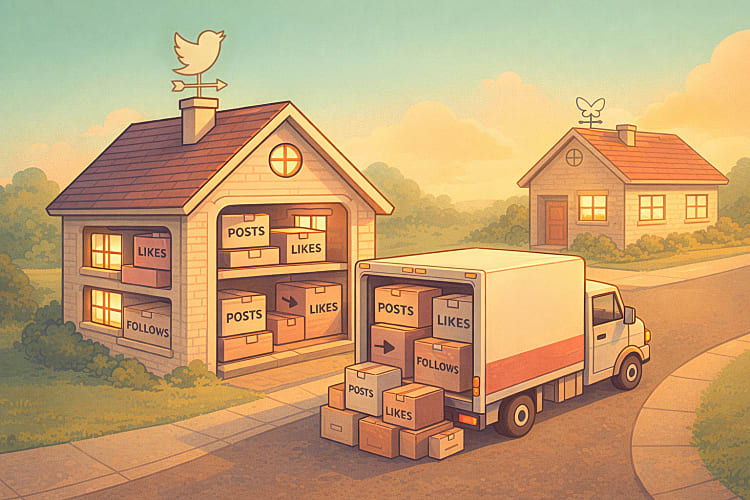
The AT Protocol tries to break this by separating your identity and your data from any single service. Your account lives on a Personal Data Server (PDS), and if you don't like the one you're on, you can move to another - or host your own - and bring everything with you. Your handle, your posts, your followers. Nothing is lost.
Think of It Like Company Email
To make this concrete, think about how company email works.
Your company runs an email server. All your emails live on that server. But email works on an open protocol - SMTP. If your company decides to switch email providers, they migrate the data to the new server. Same protocol, different server. You keep your emails, your contacts, everything.
Now imagine the same thing for social media. Your posts live on a server (your PDS). The protocol connecting everything is the AT Protocol. If you want to move to a different server - maybe for better performance, different moderation policies, or because you want to self-host - you take your data and move. Same protocol, different server. Your identity stays the same because it's tied to a DID (Decentralised Identifier), not to the server itself.
Your data is yours, and the protocol is the common language that makes everything work together.
How Is This Different from Blockchain?
When people hear "decentralised," they immediately think of crypto and blockchain. The terminology overlaps, so the confusion is understandable. But these are fundamentally different approaches.
Blockchain platforms like Ethereum rely on consensus mechanisms (Proof of Work, Proof of Stake) where every node agrees on a shared ledger. Great for financial transactions where you need trustless verification - but it comes with high latency, energy costs, and scaling challenges. Posting a social media update doesn't need the same guarantees as transferring money.
The AT Protocol uses a federated model. Your data lives on servers (PDS instances), not across a peer-to-peer network. Instead of blockchain consensus, it uses cryptographic signatures on your data repository. Your content is signed with your keys, verifiable as authentic without needing a blockchain to prove it.
Blockchain decentralises trust through consensus. The AT Protocol decentralises data ownership through signed repositories and portable identities. They sound similar, but they're solving different problems.
How Is This Different from Mastodon?
If you've explored decentralised social media, you've probably come across Mastodon and ActivityPub. Both aim for decentralisation. Both are open protocols. But they differ in key ways.
Account portability is the big one. In Mastodon, your account lives on the instance you signed up on. If that instance shuts down, your data is gone. Migration requires cooperation from the original server, and old posts don't come with you. In the AT Protocol, your data is stored in a signed repository tied to your DID. You can move everything to a new PDS without the old server's involvement.
Scalability is another distinction. ActivityPub uses per-server inboxes and outboxes - servers message each other directly. Popular instances get flooded with traffic. The AT Protocol uses Relays that aggregate content into a unified stream, and AppViews that index and serve data to applications. This makes global-scale networking more practical.
Discoverability follows from this. Finding content across Mastodon instances can be hit-or-miss. The AT Protocol's centralised indexing through AppViews makes global search straightforward.
How It Works Behind the Scenes
When you use Bluesky, here's what's actually happening:
- Your identity is a DID - a permanent identifier that belongs to you. Your handle (
alice.bsky.social) is a friendly alias pointing to it. - Your data - posts, likes, follows - lives in your PDS. Bluesky hosts one for you by default, but you could run your own.
- When you post, the data is written to your PDS. Your PDS emits the event to a Relay, which aggregates updates from all PDS instances into a real-time stream (the "firehose").
- AppViews subscribe to this stream, index the data, and present it to users. Think of an AppView as a search engine for the network.
- Anyone can build an AppView. Different algorithms, different moderation, different interface - all reading from the same underlying data.
Building a Simple AT Protocol App
Let's build a Node.js web app that authenticates users through AT Protocol OAuth and lets them view their profile and create posts. The full source code is in the GitHub repository - here I'll focus on the parts that matter.
Project Setup
npm init -y
npm install @atproto/api @atproto/oauth-client-node express iron-session better-sqlite3 kysely
npm install -D tsx @types/express @types/better-sqlite3
We're using tsx to run TypeScript directly - no build step. The --env-file flag loads environment variables natively, so no dotenv needed either.
{
    "type": "module",
    "scripts": {
        "start": "tsx --env-file=.env src/index.ts",
        "dev": "tsx watch --env-file=.env src/index.ts"
    }
}
The .env file just needs two values:
PORT=3000
COOKIE_SECRET=super-secret-cookie-key-for-development
The Project Structure
src/
├── db.ts      # SQLite database for OAuth state/sessions
├── auth.ts    # OAuth client setup and storage stores
└── index.ts   # Express server with all routes
The OAuth client needs persistent storage for session data and flow state. src/db.ts sets up an in-memory SQLite database with two simple key-value tables (auth_state and auth_session) using Kysely as a type-safe query builder. src/auth.ts implements the storage interfaces the OAuth client expects and creates the client in loopback mode - a special development mode that works on localhost without needing a public URL or private keys.
The interesting part is in src/index.ts.
Bootstrapping the Server
import { Agent } from "@atproto/api";
import express from "express";
import { getIronSession } from "iron-session";
import { createDb, migrateToLatest } from "./db.js";
import { createOAuthClient } from "./auth.js";

type Session = { did?: string };

async function main() {
    const db = createDb(":memory:");
    await migrateToLatest(db);
    const oauthClient = await createOAuthClient(db);

    const app = express();
    app.use(express.urlencoded({ extended: true }));

    // ... routes go here

    app.listen(Number(process.env.PORT) || 3000);
}
On startup, we create the database, run migrations, and initialise the OAuth client. The session cookie stores just one thing - the user's DID. From that, we can restore the full OAuth session and get an authenticated Agent:
async function getSessionAgent(req: express.Request, res: express.Response) {
    const session = await getIronSession<Session>(req, res, {
        cookieName: "sid",
        password: process.env.COOKIE_SECRET!,
    });
    if (!session.did) return null;

    const oauthSession = await oauthClient.restore(session.did);
    return oauthSession ? new Agent(oauthSession) : null;
}
The Agent is the AT Protocol client - once you have one, you can read profiles, create posts, and interact with any data on the network.
The OAuth Login Flow
The login has three parts: a form, the redirect, and the callback.
// User submits their handle → we start the OAuth flow
app.post("/login", async (req, res) => {
    const url = await oauthClient.authorize(req.body.handle, {
        scope: "atproto transition:generic",
    });
    res.redirect(url.toString());
});

// Bluesky redirects back → we complete the handshake
app.get("/oauth/callback", async (req, res) => {
    const params = new URLSearchParams(req.originalUrl.split("?")[1]);
    const { session: oauthSession } = await oauthClient.callback(params);

    const session = await getIronSession<Session>(req, res, {
        cookieName: "sid",
        password: process.env.COOKIE_SECRET!,
    });
    session.did = oauthSession.did;
    await session.save();

    res.redirect("/");
});
When the user submits their handle, oauthClient.authorize() resolves which server hosts their account and generates an authorization URL. The user gets redirected to their own Bluesky server, approves the request, and comes back to /oauth/callback. We complete the handshake and store their DID. We never see their password.
Reading and Writing Data
Once authenticated, the Agent can do everything:
// Fetch the user's profile
const { data: profile } = await agent.getProfile({ actor: agent.assertDid });

// Fetch their recent posts
const { data: feed } = await agent.getAuthorFeed({ actor: agent.assertDid, limit: 5 });

// Create a new post
await agent.post({ text: "Hello from my AT Protocol app!" });
agent.getProfile() fetches profile data from the network. agent.getAuthorFeed() retrieves recent posts. agent.post() writes a new post to the user's data repository. The agent knows which PDS to talk to because of the OAuth session - you don't have to think about the underlying routing.
Running It
npm run dev
Open http://localhost:3000, click Login with Bluesky, enter your handle, approve access on Bluesky's side, and you'll land back on the app - logged in, with your profile and a form to post.
From Bluesky Client to Your Own Social Media
So far, we've built a client that talks to Bluesky. But here's where it gets interesting: you're not limited to being a Bluesky client. The AT Protocol is designed so that you can build your own social media experience on top of the same network. Let me explain what that means in simple terms.
The App We Built Is Already More Than a Client
Look at what our little demo app does. It authenticates a user, reads their data, and writes posts to their personal repository. At no point did we talk to "Bluesky the company." We talked to the protocol. The user's data lives on their PDS, and we accessed it through standard AT Protocol APIs.
This means our app is already a separate, independent way to interact with the network. It's like building a different email client - same emails, same protocol, different experience.
Building Your Own Experience
But what if you don't want a Twitter-like feed at all? What if you want to build something completely different - a recipe-sharing platform, a book review site, a collaborative journal?
The AT Protocol supports this through Lexicons - a schema system that lets you define your own data types. Bluesky uses Lexicons like app.bsky.feed.post for posts and app.bsky.actor.profile for profiles. But you can create your own.
Say you want to build a recipe-sharing app. You'd define a schema like this:
{
    "lexicon": 1,
    "id": "com.myrecipes.recipe",
    "defs": {
        "main": {
            "type": "record",
            "key": "tid",
            "record": {
                "type": "object",
                "required": ["title", "ingredients", "steps", "createdAt"],
                "properties": {
                    "title": { "type": "string", "maxLength": 200 },
                    "ingredients": {
                        "type": "array",
                        "items": { "type": "string" }
                    },
                    "steps": {
                        "type": "array",
                        "items": { "type": "string" }
                    },
                    "createdAt": { "type": "string", "format": "datetime" }
                }
            }
        }
    }
}
That schema says: "A recipe has a title, a list of ingredients, a list of steps, and a timestamp." The id uses reverse-DNS naming (com.myrecipes.recipe) so it doesn't collide with anyone else's schemas.
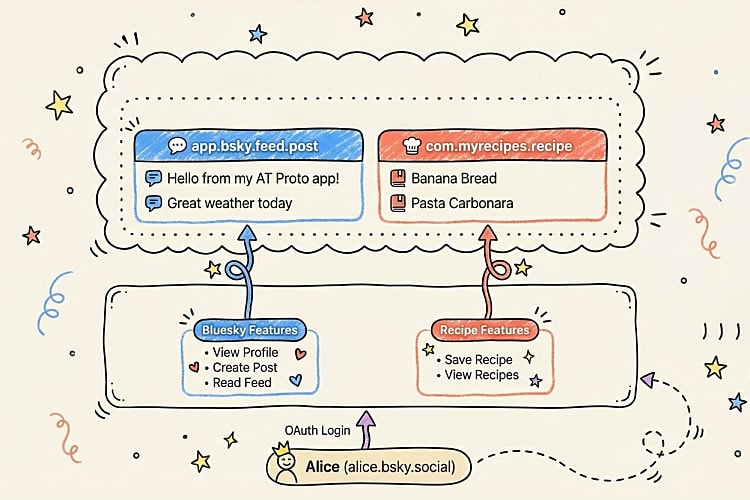
Now here's the key part - when a user saves a recipe through your app, it gets written to their PDS, just like a Bluesky post does. The recipe lives in the user's personal data repository, not on your server. The user owns it.
How Would You Actually Build This?
Let's walk through the pieces. You already know most of them from the demo app we built.
Step 1: Users log in with OAuth - exactly the same as what we already built. The user authenticates with their PDS. You get an Agent.
Step 2: Write custom records to the user's repository. Instead of agent.post() (which is a Bluesky shortcut), you use the lower-level API:
await agent.com.atproto.repo.putRecord({
    repo: agent.assertDid,
    collection: "com.myrecipes.recipe",
    rkey: TID.nextStr(),
    record: {
        $type: "com.myrecipes.recipe",
        title: "Banana Bread",
        ingredients: ["3 bananas", "1 cup sugar", "2 cups flour", "1 egg"],
        steps: ["Mash bananas", "Mix ingredients", "Bake at 180°C for 50 min"],
        createdAt: new Date().toISOString(),
    },
});
That recipe is now stored in the user's PDS under the com.myrecipes.recipe collection. It sits right alongside their Bluesky posts, their likes, their follows - all in the same personal repository but in a different collection.
Step 3: Listen to the network. This is where your app becomes a real platform. The AT Protocol provides a firehose - a real-time stream of every record being created across the entire network. You subscribe to it and filter for your record type:
new Firehose({
    filterCollections: ["com.myrecipes.recipe"],
    handleEvent: async (evt) => {
        // A user somewhere on the network just saved a recipe
        // Store it in your database for search, discovery, recommendations
    },
});
Your app collects recipes from everyone on the network who uses the com.myrecipes.recipe schema. You store them in your own database, index them, and build features on top: search, trending recipes, personalised recommendations. This is the AppView pattern - your app becomes a specialised view of the network's data.
Step 4: Other apps can read the same data. Because the recipes live in the user's PDS using a published schema, anyone else can build a different recipe app that reads the exact same data. Maybe your app focuses on quick weeknight dinners, and someone else builds one focused on baking. Same recipes, different experiences.
The Big Picture
Here's a simple way to think about the whole thing:
| Traditional Platform | AT Protocol |
|---|---|
| Your data lives on the platform's servers | Your data lives on your PDS |
| One app, one experience | Many apps, same data |
| Platform decides the algorithm | Each app chooses its own |
| You leave = you lose everything | You leave = you take everything |
| Only the platform can build features | Anyone can build an AppView |
The app we built earlier is the simplest version of this: one app talking to users' repositories. But the architecture scales all the way up to a full social media platform with its own data types, its own feed algorithms, and its own community - all while users keep ownership of their data and the freedom to leave.
That's the real promise of the AT Protocol. Not just "another Bluesky client," but a foundation for an entirely different kind of social internet.
Looking Ahead
The AT Protocol is still evolving. The core specs are being standardised through the IETF, which signals this is meant to become an open standard - not just a Bluesky implementation detail.
What I find most interesting is the architectural bet: separate the data layer from the application layer, give users real portability, and let apps compete on experience rather than on locking in users. Whether it succeeds at scale is an open question. Federation and decentralisation always bring trade-offs - complexity, consistency challenges, moderation at scale.
But the fact that you can already build working apps against this protocol, with proper OAuth and genuine data portability, puts it ahead of most "decentralisation" projects. The ambition is real, and the code is running.
The complete source code is available in the GitHub repository.
Further Reading
Explore more articles that might interest you.